
The URL Entry box is where your settings go for an individual website you plan to gather prices from. For example, if xyz.com has prices you would like to fetch, you will fill out the settings here to start the fetching process. This is the foundation of the fetching process – these settings must be in place for the fetch process to work correctly.
There is no limit to how many separate URL entries you can have (you only need to list a domain name once). Simply click Add New Entry+ to add more. Each URL entry can have it’s own settings that will override global settings.
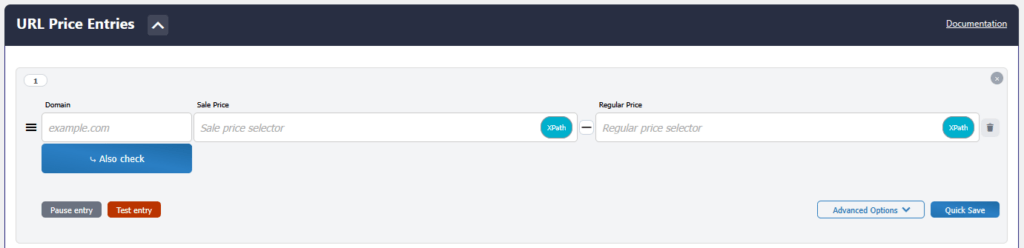
In the URL Entry box you can:
- Enter a domain name (to target)
- Enter sale price from domain (to target) – via Xpath, ID, Class, or Script
- Enter regular price from domain (to target) – via Xpath, ID, Class, or Script
- Enter in backup sale/regular price selectors
- Reverse the incoming sale/regular price
- Click and drag to re-organize entry box placement
- Pause entry
- Manage Advanced Options
Advanced Options include:
- Header Configurations
- User Agent
- Accept
- Referer
- cURL Timeout
- Verify SSL
- Override global cache
- Use Affiliate
- Use Proxy

