
PriceFetchWP includes customizable loading indicators (when ‘delay price’ is active) that display while prices are being fetched from external websites.
These loaders improve user experience by providing visual feedback during the fetch process.
– What Is a Loader?
A loader is a visual indicator (icon) that appears while PriceFetchWP is retrieving the external price.
Instead of showing an empty space, users will see an animated element until the price loads in.
– Where to Configure Loader Settings
In PriceFetchWP settings, navigate to either Page/Post Settings (Global) or WooCommerce Settings (Global).
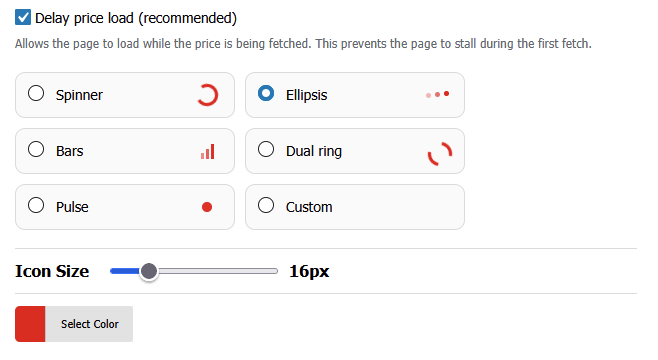
– Available Loader Types
PriceFetchWP includes several built-in loader styles:
• Spinner
A simple rotating spinner.
• Ellipsis
Animated dots that appear in sequence.
• Bars
Animated bars that move up and down.
• Pulse
A pulsing animation.
• Dual Ring
A circular dual-ring animation.
• Custom Loader
Create your own loader using custom CSS.
– Customizing Loader Appearance
You can adjust:
• Color
Set the loader color to match your theme.
• Size
Control the size of the loader for better visibility.
• Custom Loader
For advanced users, you can define your own animation.
– How Loaders Work
- Loader appears in place of the price while it’s being fetched
- Once the price is retrieved, the loader is replaced with the price
⚠️Common Issues
• Loader does not appear
- Price may be loading instantly from cache
- Delay Price may be disabled
• Loader looks too large or small
- Adjust the font size setting
• Custom loader not displaying correctly
- Check your CSS syntax
- Ensure style is applied to
.pfetch-loader-custom

